Felitaur Site
Offerings
|
|
[Webscripting Homepage] | [Javascript Homepage] | [Perl/CGI HomePage] | [PHP Homepage]
PHP Arrays Program Assignment
- arrays.php (HTML requirements)
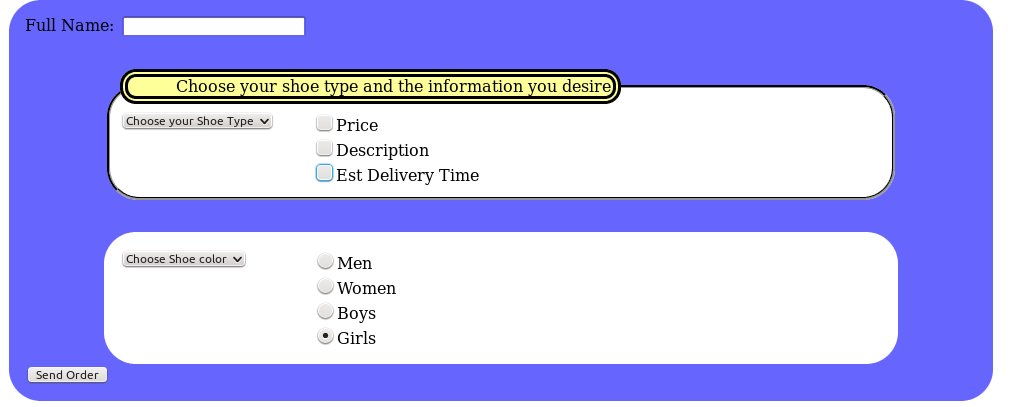
- arrays.php must generate a basic, validating HTML 5 form page that has
the fields shown.
- ALL variables from the form must use the array naming scheme
(ie name="item[firstname]") so that in the php portion, you have one
array variable that contains ALL the output from the form.
(hint: something like $item = $_POST['item']; )
- Have a text field that asks for their name
- A pull down menu that lists 8 different items to buy
- Three checkboxes so that the customer can choose to
see info on price , description and estimated weeks until
shipped. (and of course choose all three if they want)
- A pull down menu that lists options for those items
(if a list of shoes, then colors for example, but
this pull down menu does NOT have to sync up with the
first pulldown menu/checkboxes)
- A set of radio buttons that sets a limited number of choices
(for shoes, say, mens, womens , boys or girls)
- If they forget to fill items out, use an array to store and print out
their errors.
- The method can be post or get and the action should be the $_SERVER[SCRIPT_NAME] variable.
- PHP requirements
- Use the $formstuff = $_POST['item']
type
format to grab your responses from the form as an array (note: as a reminder,
namefromform is whatever you used in the name=" "
attributes in the form)
- Use an $errors array to store errors and either show form again with errors listed, or if
no errors, show output. Only need to check to see if fields are empty.
- Using an associative array of associative or indexed arrays, relate the item name of the 8 items for sale
in the first pull down menu to an array containing
- price
- detailed description (one sentence or so)
- Number of weeks to be shipped
- (So, this will be an associative array of arrays, aka multidimensional)
- So, when they choose an item in the pull down menu and submit the
form, it should return information from this "hash of arrays" based on
what check boxes they check.
-
***********************************************************
this section is independent of the previous part, as far as your
program is concerned, with the exception of detecting errors (ie nothing chosen)
***********************************************************
Create another pull down menu with a list of choices. (Note, they don't have to match
with the first pull down menu). On the PHP side, you will create an array, that
matches in order that select list. Based on what they choose from the select pull
down menu, print out the appropriate response from the array you created.
- Based on the radio buttons (again using the shoe example) retrieve
information that you have stored in yet a third array. So, if they choose "mens" have your php
script print out the range of sizes available for mens shoes.
- Print
the date
at the bottom of the page in the format Tuesday, September 12, 2006
This page last updated on:
|
|